

Your Laptop Wasn't Built for
Modern Development
AI agents, LLMs, containers, Kubernetes and heavy builds are pushing local machines past their limits. See when a Cloud Development Environment (CDE) like Coder, Ona (formerly Gitpod) or GitHub Codespaces makes sense for your team - and when it does not.

Why Dev Infrastructure Matters Now
Four figures from independent research. Each one links to its published source and names the year - check them.
No simulated numbers and no uncited percentages. Every source on this site is listed on the sources page.
Start With What Everyone Else Reads
The eight guides readers open most. Pick the question you are trying to answer today.

WebAssembly and WASI
Components, WASI, runtimes, and where a Wasm sandbox beats a container.
Read the guide
CDE Alternatives
Replacements for Codespaces, Gitpod and Cloud9, compared side by side.
Compare the options
Microsoft Dev Box
How it works, what it costs, and where the product is headed.
Read the review
Agentic AI
The agent loop, autonomy levels, and the controls each level needs.
Understand agents
CDE FAQ
Straight answers to the questions teams ask before leaving laptops.
Get answers
Remote Dev Protocols
SSH, tunnels, and the protocols that connect an IDE to a workspace.
See how it connects
DevEx Metrics
What to measure, what to ignore, and how to read the numbers honestly.
Measure what matters
Getting Started
From nothing to a running cloud workspace in about five minutes.
Start hereWhat Is the Infrastructure Gap?
It is the distance between what a developer laptop can do and what modern software asks of it. A laptop is sized for email and documents, then expected to run a container stack, several databases, a Kubernetes cluster, and now AI agents that want a GPU and a safe place to execute code.
The gap shows up as slow builds, "works on my machine" bugs, week-long onboarding, source code sitting on unmanaged disks, and agents running with the same credentials as the person at the keyboard.
A Cloud Development Environment closes it by moving the workspace to managed infrastructure and leaving only the editor on the laptop. It is not the right answer for every team - see local vs cloud development for the honest trade-offs.
Read the core concept
How a CDE Works
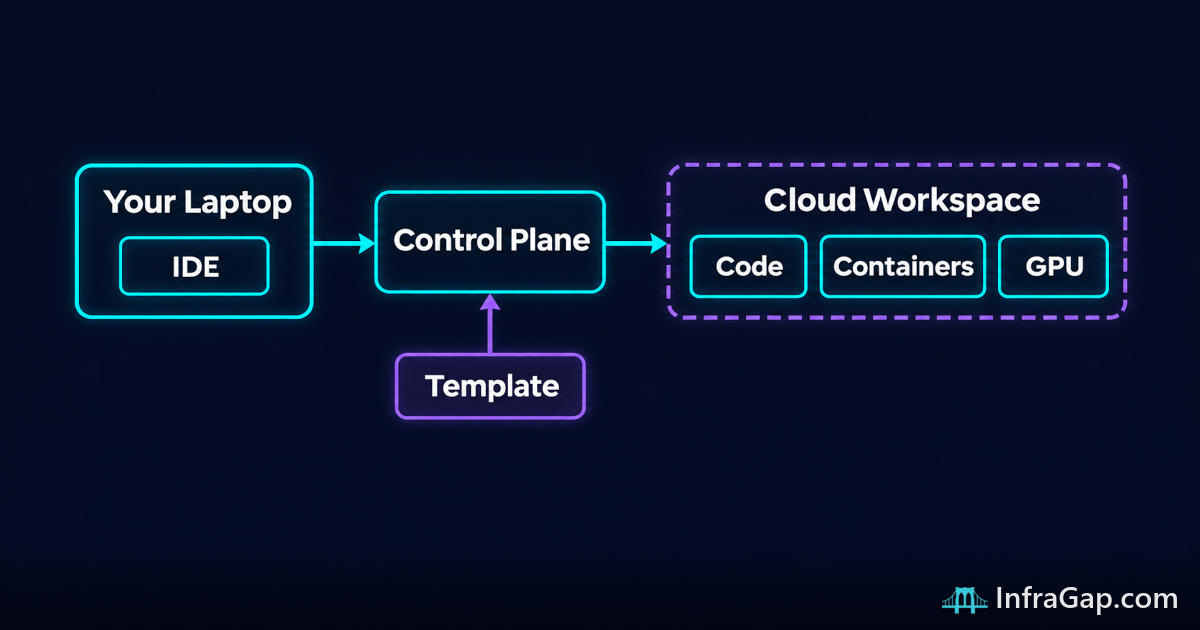
Three moving parts, whichever product you pick. The editor stays where you are; everything heavy runs somewhere else.
1. Your IDE stays local
VS Code, a JetBrains IDE or a browser tab connects over SSH or a tunnel. Keystrokes travel; source code and secrets do not have to.
2. A control plane builds the workspace
It reads a template - Terraform, a devcontainer.json or a vendor format - checks who you are, and provisions the same environment for every developer and every agent.
3. The workspace runs in the cloud
A container, VM or microVM holds the code, the toolchain and the compute. It stops when idle and is rebuilt from the template, not repaired by hand.
Choose Your Path
The same platform looks different depending on what you are accountable for. Start with the track built for your role.
Developer
Get a workspace running, connect your IDE, and keep your inner loop fast.
Platform Engineer
Design templates, size capacity, and run the platform other teams build on.
Security and Compliance
Map HITRUST, SOC 2 and GDPR controls to workspaces, identities and agents.
Engineering Manager
Build the business case, plan the rollout, and measure whether it worked.
From Laptop to Cloud Workspace in Five Steps
Most failed rollouts skipped a step, usually the first or the third. This is the order that works, with the guide for each stage.
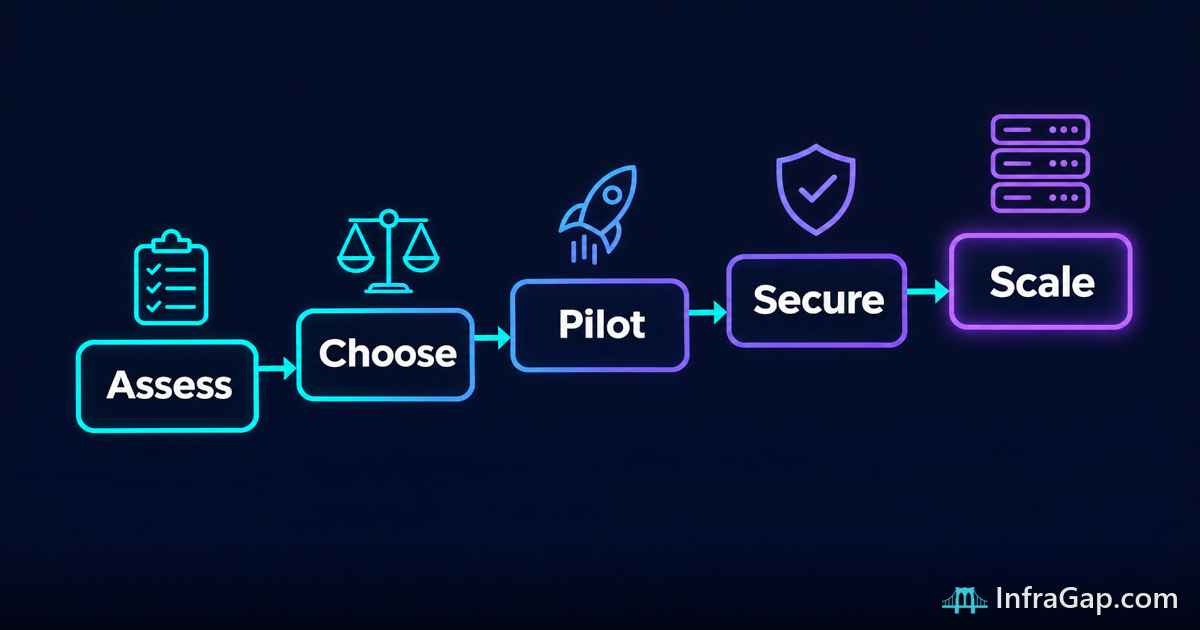
1. Assess
Score your team on the 40-point checklist before you look at a single vendor.
2. Choose
Compare self-hosted and managed platforms on hosting model, price and lock-in.
3. Pilot
Prove it with one team and one real repository, with exit criteria written first.
4. Secure
Lock down identity, network egress and secrets before the second team joins.
5. Scale
Size the fleet, set idle shutdown, and keep the monthly bill predictable.
AI Agents Need Somewhere Safe to Run
A coding agent that can run shell commands should not share a laptop with your SSH keys, browser sessions and production credentials. Isolated, disposable workspaces are how teams give agents real autonomy without giving them the keys - which is why agent infrastructure and CDEs have become the same conversation.
Adoption Is Up. Trust Is Not.
Nearly every developer now uses AI, yet more of them distrust its output than trust it. That is the case for controlled, observable environments in three bars.
Sources: DORA 2025 for use, which also reports a median of 2 hours a day in AI tools; Stack Overflow Developer Survey 2025 for trust. Two different surveys, so read the bars side by side, not as one sample. More on the productivity paradox.


Explore the CDE Guide
More than 130 guides, vendor reviews and comparisons, plus a 99-term glossary. Jump straight to a topic.
Independent by Design
We are not here to sell you on cloud development. Figures are linked to their published sources, vendor facts carry the date they were checked, and every review says who a product does not fit as plainly as who it does.
Whether you are a platform engineer standardizing environments with Terraform, a security lead mapping HITRUST and SOC 2 controls, or a team weighing build vs buy, the goal is an informed decision, not a particular one.


Not Sure If a CDE Is Right for You?
Take the interactive 40-point assessment. It scores security, compliance, team productivity and infrastructure readiness, and it is just as happy to tell you to stay local.
Start the ChecklistBuilt as the go-to resource by developers, for developers
RJL.dev